

8 proven laptop battery charging mistakes that shorten battery life
There’s a quiet frustration that creeps in when your laptop battery starts behaving differently. It doesn’t happen all at once. One day you notice it drops from 40% to 10% faster than usual. Another day, it refuses to charge beyond a certain point. Before you know it, you’re tethered to a charger like it’s a permanent extension of your device. Most people blame the battery itself, assuming it has simply “aged.” But in many cases, the real culprit is daily charging habits that slowly, almost invisibly, wear the battery down.
Laptop batteries today are far more advanced than they were a decade ago. They’re smarter, more efficient, and designed to last longer. Yet, even with these improvements, certain charging behaviors can quietly sabotage their lifespan. What makes this worse is that many of these habits feel completely normal. In fact, they’re often recommended by outdated advice that no longer applies to modern lithium-ion batteries.
This article takes a deeper look at eight proven mistakes that shorten laptop battery life. Not just listing them, but unpacking why they matter, how they affect your device over time, and what subtle changes can make a meaningful difference.
keeping your laptop plugged in all the time
It seems harmless. You’re working at a desk, your charger is nearby, and you simply leave your laptop plugged in throughout the day. After all, doesn’t this prevent battery cycles and extend its life?
Not quite.
Modern laptops use lithium-ion batteries, which don’t thrive when kept at 100% charge constantly. When a battery remains fully charged for extended periods, it experiences what’s known as “voltage stress.” This doesn’t immediately damage the battery, but over weeks and months, it accelerates chemical aging inside the cells.
Imagine constantly stretching a rubber band to its maximum length and holding it there. It won’t snap immediately, but it will lose elasticity faster. That’s similar to what happens inside your battery.
A healthier approach is to keep your battery between 20% and 80% when possible. Some laptops even offer built-in battery health modes that cap charging at 80%. Using these features can significantly slow down long-term wear.
letting the battery drain to zero regularly
There’s a persistent myth that you should let your battery drain completely before charging it again. This advice comes from the era of nickel-based batteries, which suffered from something called “memory effect.” Lithium-ion batteries, however, behave very differently.
Deep discharges—running your battery down to 0%—put unnecessary strain on it. Each time you do this, the battery undergoes a full cycle, and full cycles contribute more to wear than partial ones.
More importantly, repeatedly hitting 0% can destabilize the battery’s internal chemistry. In extreme cases, it may even lead to the battery refusing to charge properly.
A better habit is to plug in your laptop when it reaches around 20–30%. Shallow discharges are far less stressful and help maintain battery health over time.
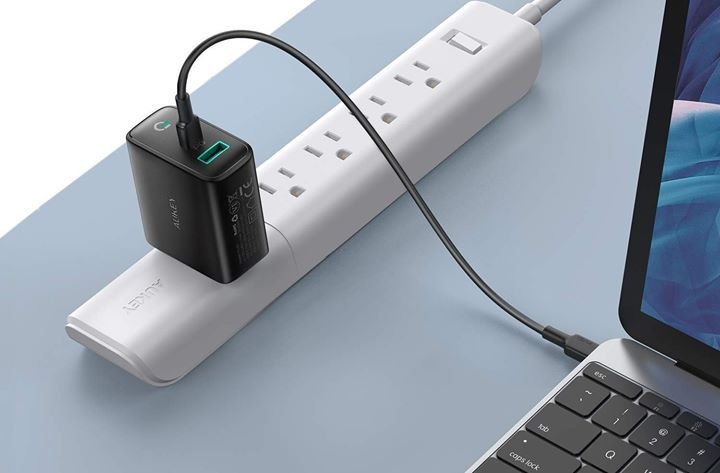
using cheap or incompatible chargers
Not all chargers are created equal. While it might be tempting to buy a cheaper alternative when your original charger breaks, this decision can have consequences that go beyond slower charging.
Low-quality or incompatible chargers may deliver inconsistent voltage or current. This instability can generate excess heat and stress the battery. Over time, this not only reduces battery capacity but can also impact other internal components.
Even when a charger “works,” it doesn’t mean it’s safe. Subtle inconsistencies are enough to cause gradual damage.
Whenever possible, use the original charger provided by the manufacturer or a certified replacement. It ensures stable power delivery and protects your battery from unnecessary strain.
charging in high-temperature environments
Heat is one of the biggest enemies of battery health. Yet, it’s often overlooked because it’s not always obvious.
Using your laptop on a soft surface like a bed or cushion can trap heat. Charging it in a hot room or under direct sunlight makes things worse. When a battery charges, it naturally generates heat. Combine that with external heat, and you create a perfect storm for accelerated degradation.
High temperatures speed up chemical reactions inside the battery, leading to faster aging. Over time, this reduces both capacity and efficiency.
If your laptop feels unusually warm while charging, it’s worth paying attention. Place it on a hard, flat surface, ensure proper ventilation, and avoid charging in hot conditions whenever possible.
ignoring partial charging benefits
Many people think charging habits must follow strict rules: either fully charge or fully discharge. In reality, lithium-ion batteries are far more flexible—and they actually prefer partial charging.
Charging from 40% to 80% is significantly less stressful than charging from 0% to 100%. Each time you avoid extremes, you reduce wear on the battery.
This doesn’t mean you should never charge to 100%. Occasional full charges are fine and even helpful for calibration. But making it a daily habit can slowly chip away at battery longevity.
Think of it less like a strict rulebook and more like a gentle guideline. Stay in the middle range when convenient, and your battery will thank you over time.
leaving your laptop unused with a dead battery
Sometimes laptops sit unused for weeks or months. Maybe it’s a backup device, or you simply forgot about it. If it’s left with a completely drained battery, this can lead to deep discharge—a state where the battery voltage drops too low.
Deep discharge can permanently damage lithium-ion batteries. In some cases, the laptop may not even power on again because the battery can no longer hold a charge.
If you plan to store your laptop for a while, charge it to around 50% before turning it off. This level is ideal for long-term storage and helps preserve battery health.
Additionally, it’s a good idea to check on it every few weeks and top it up if needed.
overusing fast charging without consideration
Fast charging is convenient. It gets you back to work quickly, especially when you’re in a hurry. But frequent use of fast charging can generate more heat compared to standard charging.
Heat, as mentioned earlier, is a major factor in battery degradation.
This doesn’t mean fast charging is inherently bad. It’s designed to be safe and efficient. However, relying on it constantly—especially in warm environments—can contribute to faster wear over time.
When you’re not in a rush, using regular charging can be gentler on your battery. It’s about balance rather than avoidance.
ignoring software and battery optimization settings
Modern laptops come equipped with intelligent battery management systems. These include features like adaptive charging, battery health modes, and usage-based optimization.
Many users either don’t know these features exist or simply ignore them.
For example, some systems learn your usage patterns and delay charging past 80% until just before you need the laptop. Others allow you to manually limit the maximum charge level.
These features are designed specifically to extend battery life. Not using them is like having a tool and leaving it untouched in the box.
Taking a few minutes to explore your laptop’s settings can unlock options that significantly improve battery longevity with minimal effort.
the bigger picture: small habits, long-term impact
What makes these mistakes tricky is that none of them cause immediate damage. You won’t notice your battery deteriorating overnight. Instead, the effects accumulate slowly.
A few degrees of extra heat here. A few unnecessary full charges there. Over time, these small factors add up, resulting in a battery that feels older than it should be.
The good news is that the opposite is also true. Small improvements in charging habits can have a meaningful impact. You don’t need to be perfect. Even adopting two or three better practices can extend your battery’s lifespan noticeably.
It’s less about strict discipline and more about awareness.
practical daily routine for better battery health
Instead of overthinking every charge, a simple routine can help:
Start your day with a charge up to around 80–90%
Plug in when the battery drops to about 20–30%
Avoid keeping it at 100% for long periods
Keep your laptop cool and well-ventilated
Use original or certified chargers
These small adjustments require minimal effort but create a healthier environment for your battery.
frequently asked questions
- Is it bad to leave my laptop plugged in overnight?
Not immediately harmful, but doing it regularly keeps the battery at 100% for long periods, which can accelerate wear over time. If your laptop has a battery limit feature, enabling it can reduce the impact. - Should I always charge my laptop to 100%?
No. While occasional full charges are fine, keeping your battery between 20% and 80% is generally better for long-term health. - How often should I let my battery drain completely?
Rarely. Full discharges are not necessary for lithium-ion batteries. Once every few months for calibration is enough. - Does fast charging damage the battery?
Not directly, but it generates more heat. Frequent use in warm conditions can contribute to faster battery degradation. - What is the ideal temperature for charging a laptop?
Room temperature is best. Avoid charging in very hot or very cold environments, as extreme temperatures can harm the battery. - Can I use my laptop while it’s charging?
Yes, it’s completely safe. Just ensure proper ventilation so heat doesn’t build up excessively.
In the end, battery health isn’t about perfection. It’s about consistency. The way you charge your laptop today shapes how it performs months or even years from now. By avoiding these common mistakes and making small, mindful adjustments, you give your device the best chance to stay reliable for the long haul.






